LRS Configuration
Introduction
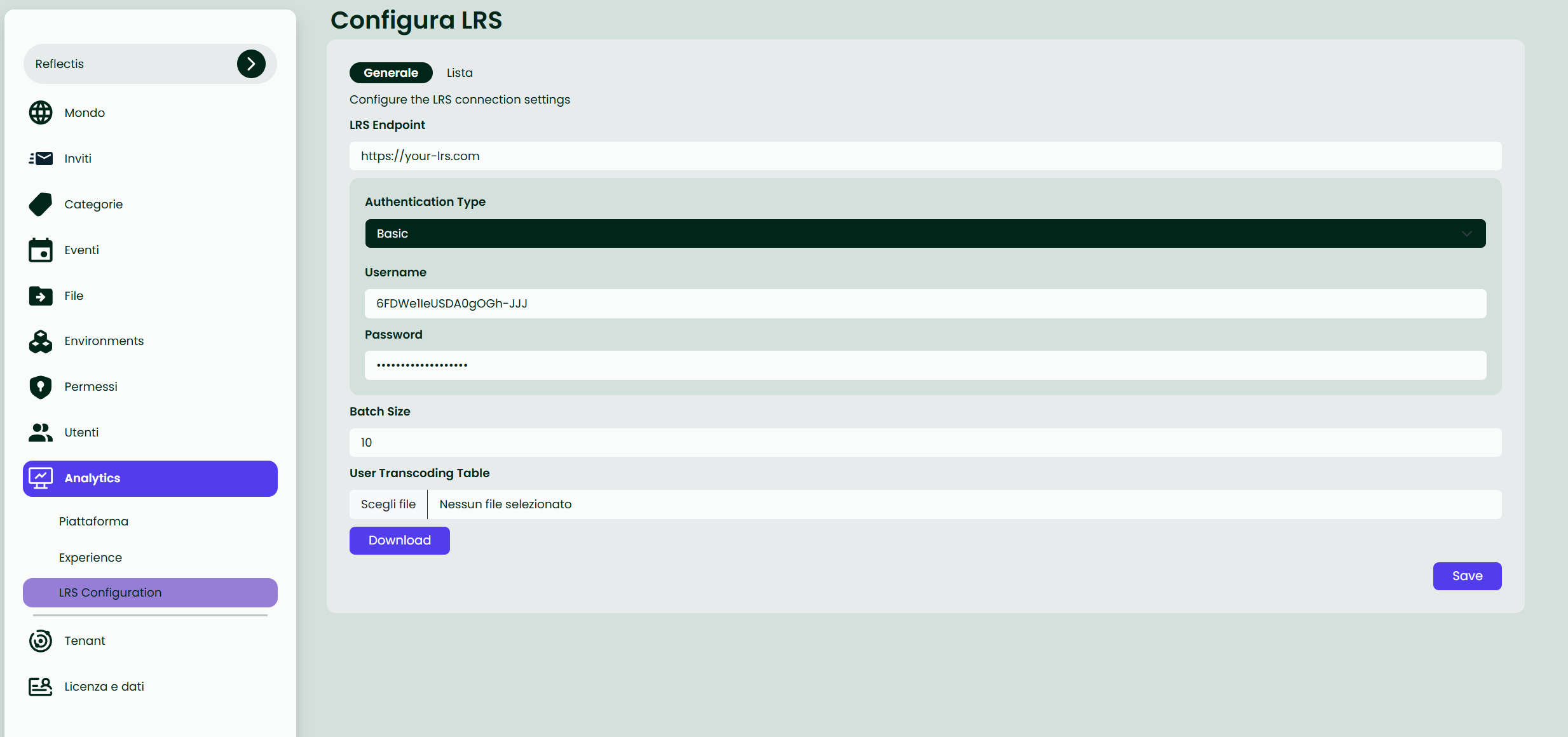
The LRS Configuration page allows administrators to integrate an external Learning Record Store (LRS) with the platform's analytics system. By providing the required connection details and choosing the appropriate authentication method, the World Owner can seamlessly track and store user learning data in a dedicated LRS.
Overview
-
LRS Endpoint: The base URL or endpoint of the external LRS ( e.g., https://your-lrs.com).
-
Authentication Type: The method used to authenticate requests to the LRS. Three methods are available:
- Basic: Provide a Username and Password.
- Bearer: Provide a Token.
- Custom Headers: Enter one or more custo header Name-Value pairs.
-
Batch Size: The maximum number of xAPI statements sent in a single request. Larger batch sizes may improve efficiency but can also affect performance.
-
Upload/Download User Transcoding Table:
- Download: Retrieves the current CSV file containing user mappings.
- Upload: Allows the user to upload a CSV file that maps platform user emails to external LRS user IDs.
- Save: Saves the current LRS configurations.
To ensure that user experiences are correctly tracked in the configured LRS, the environment must be set up using the Creator Kit with the appropriate xAPI nodes. This configuration enables the platform to send the necessary experience signals to the LRS.